Source switching
One account runs dry. The next one takes over.
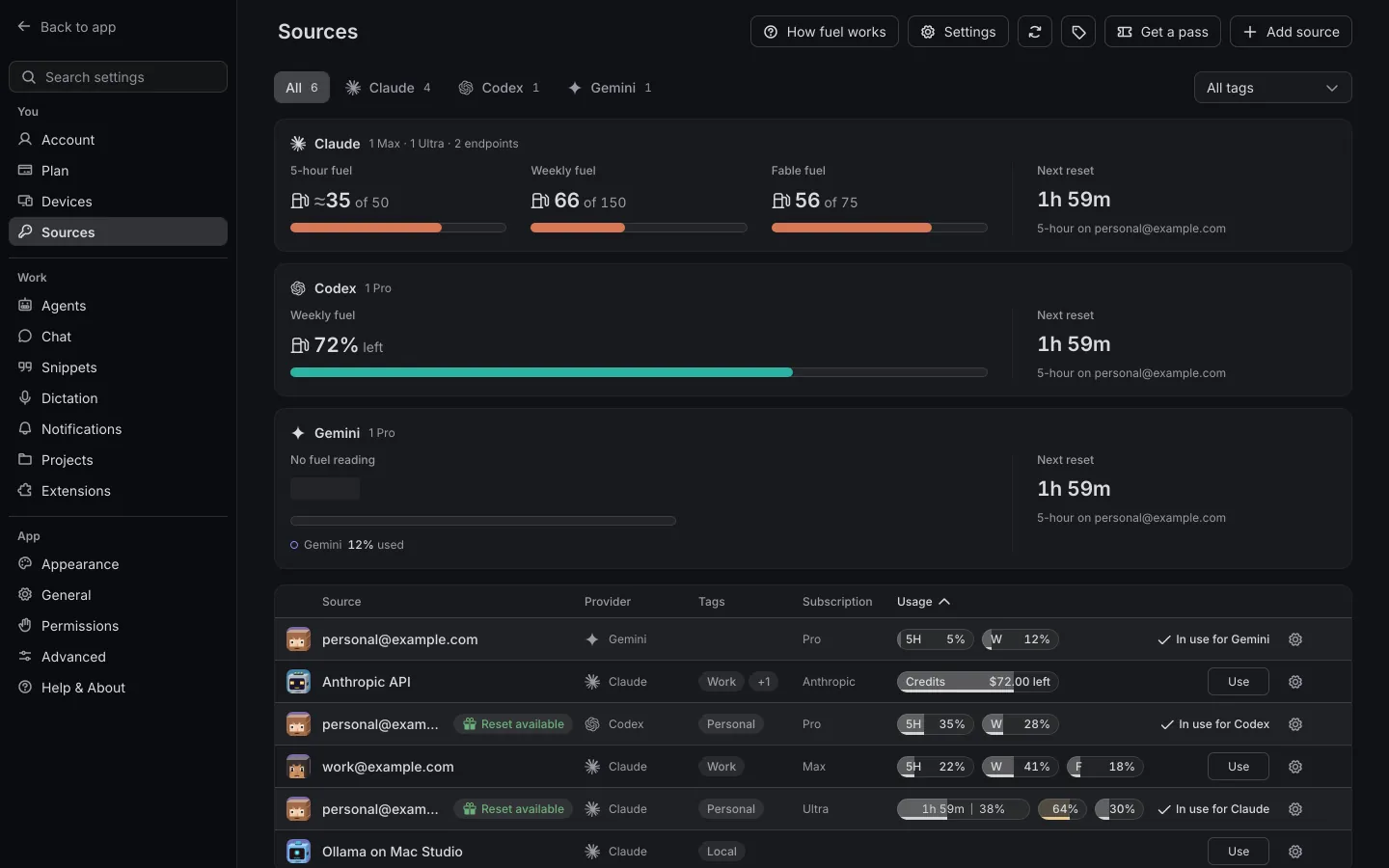
Source switching moves your running chats to another of your own accounts by itself, mid-task, when the one in use reaches your switch point, 99% by default. The chats keep going on every device at once, and with Switch to API keys on, your keys take over once every subscription is out.

The problem
A plan runs out in the middle of a task.
Claude Code and Codex stop when the account in use reaches its 5-hour or weekly limit. If you hold a second plan, the usual way on is to log out, log in to the other account and pick the chat up again, on every computer that was running something.
None of that is hard. It just happens at the worst moment, often while you're away from the desk.
How Shuriken handles it
How it works
-
Add your sources.
Sign in to each subscription or paste an API key: Claude, ChatGPT, Gemini, Copilot and more, as many per provider as you have.
-
Set your switch point.
Choose when chats leave an account, anywhere from 50% to 100% of a window. It's 99% until you change it.
-
Keep working.
When the account in use gets there, your chat moves to the account with the most room and tells you so.
-
Or spread the load.
Switch Rotation to Distribute and Shuriken also moves work every 15 to 60 minutes to the account with the most left.
Stop juggling by hand.
What changes when the switching is done for you.
| Juggling accounts by hand | With Shuriken | |
|---|---|---|
| An account hits its limit | The agent stops: “You've hit your limit” | The chat moves to an account with room |
| Moving work over | Log out, log in, hand the project over | Nothing to do |
| Running subagents and workflows | They stop with the account | They move with the chat (Claude Code) |
| Knowing what's left | A browser tab per provider | Every account's 5-hour and weekly use, side by side |
| When to switch | When it fails | At your switch point, from 50% to 100% |
The details
At the limit or Distribute
Move only when an account runs out, or spread the work across accounts on a clock.
Switch to API keys
Turn it on and chats go to your API keys once every subscription is out. You can add more than one key, and each run stops at its spend cap.
Subagents move too
A Claude Code chat moves on its next request, with its subagents and workflows.
Every device follows
Each provider has one account in use, the same on every computer and server you've linked.
Local models
Point a source at Ollama or LM Studio. It costs nothing and switches like any other.
Tags
Tag sources Work, Personal or Client, and filter the Sources table by them.
Live cost
A chat shows what its turn costs as it runs, for every agent that reports its usage as it goes.
Good to know
- Every other agent, Codex included, moves when its current turn ends.
- Shuriken also switches the moment a provider reports a limit, before your switch point.
- Shuriken only uses the plans and keys you add. Add the ones you're entitled to use.
Questions
When does Shuriken switch accounts?
When the account in use reaches your switch point, 99% of a limit unless you change it, anywhere from 50% to 100%. It also switches the moment a provider reports a limit. The chat moves to the account with the most room and a Switched to card says so.
Does the chat start over?
No. A Claude Code chat moves on its next request, with its subagents and workflows. Other agents move when their current turn ends and carry on in the same chat.
Will it spend my API keys?
Only if you turn on Switch to API keys. Then your API keys take chats once every subscription of that agent is out. You can add several, and each run on a key stops at its spend cap, $25 by default.
Which accounts can I add?
The plans and keys you hold and are entitled to use: Claude, ChatGPT for Codex, Gemini, Copilot and more, several per provider. Free has 2 sources; Pro has no limit on sources.
Bring your agents. Keep your accounts.
A new account's first 30 days of Pro are free. Cancel any time.