Ollama and LM Studio as sources
Use LM Studio or Ollama with Claude Code or Codex: add a local model as a source in Shuriken in three steps and test it. It runs on your own computer.

Contents
From Shuriken 5.1, a source can be a model running on your own machine. Point it at Ollama, LM Studio, or any Anthropic- or OpenAI-compatible address, and Claude Code or Codex can use it like any other account. It runs on your own hardware, so the price is some electricity and a warm laptop.
Why we added it#
Local models kept coming up for two reasons. Some of us wanted a model that keeps working when every plan is out for the afternoon. Others had code they'd rather not send anywhere, and a decent GPU sitting idle under the desk.
Both Ollama and LM Studio now speak Anthropic's API as well as OpenAI's: Ollama from version 0.14.0, LM Studio from 0.4.1. That means Claude Code can talk to them directly, and Codex talks to their OpenAI-compatible side (Ollama 0.13.3 or LM Studio 0.3.29 and later). What was missing was a two-minute setup instead of an afternoon of environment variables, so we built that.
Set it up in three steps#
- Start the model server. Open Ollama or LM Studio and load a model. For LM Studio, start its local server (it listens on port 1234 by default). Ollama listens on port 11434.
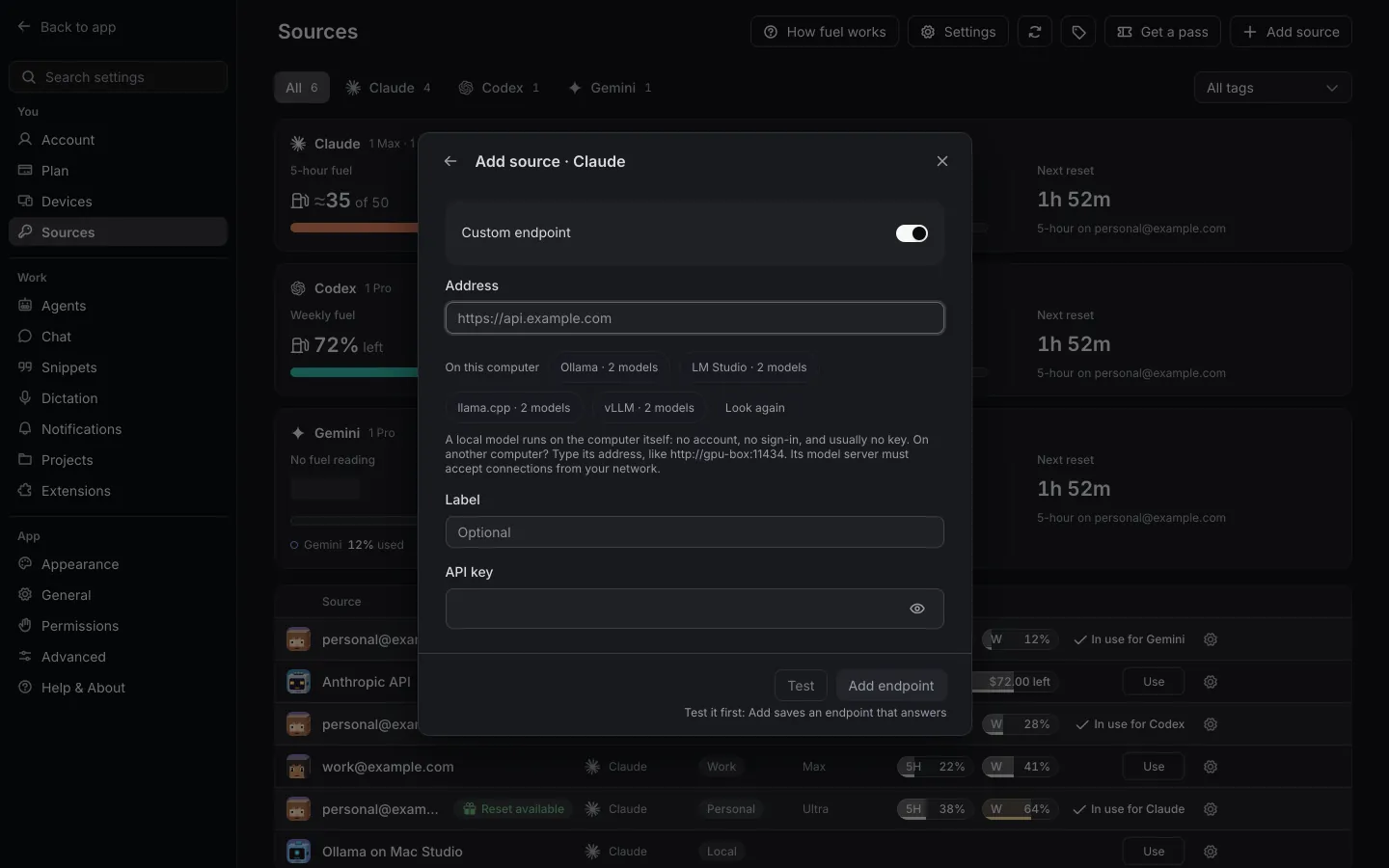
- Add it as a source. In Shuriken, open Sources and choose Add source. Pick the agent it's for, Claude Code or Codex, then Custom endpoint. Under "On this computer", choose Ollama or LM Studio, and the address fills itself in. No key needed.
- Test, then add. Press Test. You should see "Reached" with the number of models the server offers. Add the source, and you're done.
The model server can live on another machine too, like a desktop with a big GPU across the room. Type its address instead. Plain http:// is fine on your own computer and local network; anything public needs https://.
How it behaves once it's added#
A local source sits in Sources next to your subscriptions and API keys, marked as local. Press Use to make it the source in use. Otherwise it waits its turn: like an API key, it never goes ahead of a subscription. Once every subscription of that agent is out, source switching can move a Claude Code or Codex chat onto it between turns, as long as the chat's history can be read there. For other agents it only takes over with Switch to API keys turned on. Where other chats show a running cost, a chat on a local model just says it's local: there's no bill to count.
Everything else stays the same. The chat can work on its own branch, the queue works, Activity shows what's running, and your MCP servers are there.
When a local model makes sense#
When your plans are out, a local model can keep small jobs moving while you wait for a limit to come back, without touching an API key's budget. (If you'd rather spend money than wait, API keys are the other last resort, and what to do when you hit a Claude limit lists the other options.)
When the code shouldn't leave the building, a model on your own computer means the model's requests go to your own machine, not a provider.
It also suits small, repetitive work where a smaller model is good enough and speed matters less: renaming across files, writing docstrings, scaffolding tests, tidying a changelog. And it's a way to compare a few open models on your own code, on your own hardware.
When it doesn't#
Better to know this before you download 40 GB of weights. Long refactors, gnarly debugging and other big, multi-step agent work are where the frontier models still earn their price, and a local model may get lost halfway.
Context is the second catch, because coding agents send a lot of it. LM Studio's own Claude Code guide suggests a context length above about 25,000 tokens, and Ollama recommends at least 32,000. Smaller windows mean the agent forgets things quickly.
Then there's your hardware. A model that barely fits in memory will be slow, and a slow model makes for a slow agent. And a laptop on battery won't stay on battery long.
Tool use varies too. Agents depend on the model calling tools reliably, and some open models do this well while others don't. Try a model on a small task before you trust it with a big one.
Where to go next#
Which addresses work is on the local models feature page, and how switching decides which source to use next is on the source switching page. To set either agent up by hand instead, see our guides to Claude Code with Ollama and Codex CLI with local models.
Local models are on every plan, Free included. Try Shuriken and give your GPU something to do.
Sources
- Claude Code with Anthropic API compatibility (Ollama blog) (accessed 22 October 2026)
- OpenAI compatibility (Ollama docs) (accessed 22 October 2026)
- API changelog (LM Studio docs) (accessed 22 October 2026)
- Use Claude Code with LM Studio (LM Studio docs) (accessed 22 October 2026)
Frequently asked questions
Do I need an API key for Ollama or LM Studio?
No. For a model on this computer or your local network the key is optional, and Shuriken fills in a stand-in the server ignores. If you turned on authentication in LM Studio, type its token instead.
Can I use a model running on another machine on my network?
Yes. Type that machine's address. Plain http:// works for addresses on this computer and your local network; public addresses need https://.
Which versions of Ollama and LM Studio work?
For Claude Code, the server must speak Anthropic's Messages API: Ollama 0.14.0 or later, LM Studio 0.4.1 or later. Codex uses the OpenAI Responses API, served by Ollama 0.13.3 and LM Studio 0.3.29 or later.


