Terminal look: a Claude Code GUI that reads like a CLI
Prefer the terminal? Switch Shuriken to Terminal look: monospace text, a › prompt, tool runs as one ● line. Same app, same shortcuts.

Contents
Terminal look switches the whole Shuriken app to the way a CLI reads: every word in a monospace face, square corners, your message behind a › prompt, each tool run on one dim line that starts with ●, and a braille spinner where something is working. It is one setting, Settings › Appearance › Style, and it changes the drawing only. Everything you click or type works as before.
Why we built it#
Claude Code and Codex are terminal apps first. If that is where you feel at home, you know how a terminal reads: text in one column, nothing rounded, no bubbles, tool calls listed as they happen. Shuriken's Standard look is a calmer app with cards, icons and message bubbles. Terminal look gives the same app a second style for people who would rather read it the terminal way.
What changes#
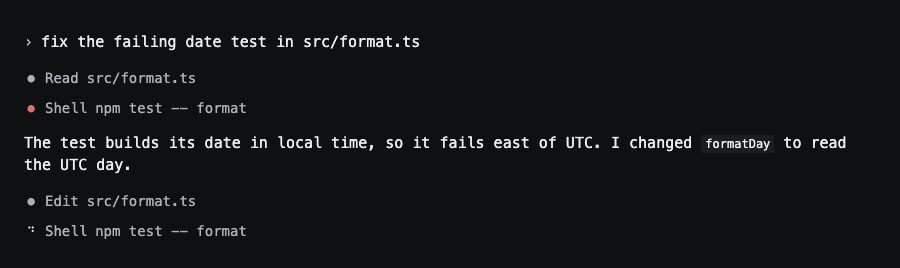
- Text. Every word is set in JetBrains Mono, the font the built-in terminal uses. Zoom works as before.
- Your messages. No bubble on the right. Your message starts at the left edge behind a
›, the way you typed it at a prompt. - Tool runs. Each run is one line:
● Read src/app.ts. The dot is quiet when the run finished, red when it failed, yellow when it warns. Click the line and its details open, as in Standard. - Progress. A running tool and the Thinking line show a turning braille cell instead of a shimmer or dots. With Reduce motion on it turns at half speed rather than stopping, so you can still see work is happening.
- Corners and cards. Buttons, fields and menu rows get 2 px corners; cards, menus and dialogs 4 px. Cards drop their fill and keep a thin border. Dots, switches and avatars stay round.
What stays the same: the layout (sidebar, chat, side panel), every coding agent you run, the queue, live cost, keyboard shortcuts, right-click menus and screen reader labels.
Turn it on#
- Open Settings › Appearance.
- Under Style, pick Terminal. Each choice has a small drawing of a chat in that style.
- That's it. The app redraws at once, and your other devices follow, because the style is saved to your account like the theme.
Colours come from your theme#
Terminal look has no palette of its own. Pick any of the ten themes, light or dark, and Terminal look draws with it. Where it needs a colour that means something, like a failed run, it takes the red and yellow from the theme's terminal colours, the same ones the built-in terminal uses.
Still a GUI#
Terminal look is a style, not a terminal. You still get what a GUI adds over a bare CLI: chats side by side on their own branches, sources that switch when one nears its limit, a queue you can reorder, and the cost of each turn while it runs. If you are comparing apps for Claude Code, our list of Claude Code apps covers the others too.
Terminal look is on every plan. Download Shuriken and switch it on in Settings › Appearance.
Frequently asked questions
Where do I turn it on?
Settings › Appearance › Style, then pick Terminal. The choice belongs to your account, so every device you sign in to switches with it.
Does it change how anything works?
No. Every button, menu, keyboard shortcut and screen reader label is the same as in Standard. Only the drawing changes: the font, the corners, and how your messages, tool runs and progress are shown.
Which font does it use?
JetBrains Mono, the face Shuriken's built-in terminal already ships with. Code, diffs and file paths use it in both styles; Terminal look uses it for every other word too.
Does it work with every theme?
Yes, all ten, light and dark. The theme still picks the colours. A failed tool run's dot takes the theme's own terminal red, and a warning its terminal yellow.
Is Terminal look on the Free plan?
Yes. It is an appearance setting, part of every plan.
Try Shuriken on your own computerYou're signed in
Add your Claude, Codex and Gemini accounts once. Shuriken switches between them so your agents keep working.Your accounts, projects and chats are in the app.

 Coming soon

