How to review AI-generated code without reading every line
We review agent diffs tests first: would each test fail without the change? Then deletions, the diff's edges, secrets, and a run. Our real misses.

Contents
To review AI-generated code, skip the top-to-bottom read. Start with the tests and ask if each would fail without the change. Then read the minus lines (git diff main...HEAD | grep '^-'), the file list (git diff --stat) and anything near a secret, and run the change once before it merges.
Most of Shuriken is written by coding agents, several at a time, and we read their diffs. From 29 September to 25 October 2026 our main branch took 5,080 commits; 1,114 name the check that guards them, and 538 add "red without", meaning that check failed on the old code. The bugs below are ours, with their dates.
How we review AI-generated code, in order#
1. Tests: would this one fail without the change?#
On 25 October 2026 we found two of our own end-to-end specs that were meant to check what happens when Claude Code fails to install. Both test setups already had Claude Code on the computer. So the app skipped its "Choose your agents" step, nothing was installed, nothing failed, and both specs passed. They had been green while testing nothing. The fix took Claude Code off the test computer and made its installer fail on purpose.
That is why our commit messages say "red without": the new test was run against the old code and failed there. When 3.0.2 fixed 18 verified defects, each one came with a test that fails without its fix.
We also grep the test part of the diff for three things: .skip, toBeTruthy sitting where an exact value used to be, and old expected values rewritten to match whatever the code prints now. When we're not sure about a test, we revert only the source change in a scratch copy and run the test there. If it's green both ways, it isn't testing the fix.
2. Everything that was deleted#
git diff --name-status main...HEAD | grep '^D'   # deleted files
git diff main...HEAD | grep '^-' | grep -v '^---'  # deleted lines
One deletion from our own history: on 29 September 2026 a big change took an old plugin system out of our background service. One plugin test went with it, and so did the createWorkspace helper that lived next to it, which four other tests in the same file still called. Our server typecheck skips test files, so nothing complained until the integration step in CI failed 4 of 4 with ReferenceError: createWorkspace is not defined. The next commit put the helper back.
Every removed line should have a reason you can name. "It was in the way" isn't one.
3. The diff's edges#
git diff --stat main...HEAD
We read that file list before any file. If the chat was about the date parser and ci.yml is on the list, that's the first file we open.
The edges also include files other agents are editing. Ours commit only the hunks they wrote, and on 29 September 2026 seven of those commits put a hunk outside the block it came from, so main stopped parsing. scripts/check-staged-parse.mjs went in the same day. It parses the staged copy of each file before the commit, and it refuses anything staged from .secrets/.
4. Checks the agent can skip#
Our lefthook.yml formats, lints and typechecks before every commit, but a commit made with --no-verify skips all three, and our agents' lanes commit that way on purpose. On 2 October 2026 CI run 37026618495 failed with 20 unformatted files and 17 lint errors. Since then check-staged-parse.mjs runs oxfmt --check and oxlint on the staged files itself.
For your own repo, search the added lines for keys and tokens:
git diff main...HEAD | grep '^+' | grep -iE 'key|token|secret|passw|authorization|\.env'
Then read every change to permissions or auth. Claude Code has a /security-review command that runs a security pass over the changes on your branch (Anthropic's security docs). We use passes like that as a second reader, not the only one.
5. Run it#
On 30 September and 1 October 2026 we ran two final review passes over the whole app, using it at desktop width and at a phone's 390 pixels. They landed 347 commits. Two of the bugs they found could not have been found by reading a diff:
- A server install command run after its one-hour token expired, piped to
shwithwget, printed nothing, ran an empty script and exited 0, as if it had worked. It now prints that the command expired and exits 1. - Our Arabic buttons were machine-translated as third-person verbs: Cancel read "he cancels" in 12 places, Create used the verb for what God does, and git's Commit became "commits a crime". The diff of a translation file looks fine. The app in Arabic did not.
Open the app, click the button the task was about, call the endpoint with curl.
A second reader that didn't write it#
We stopped asking the agent that wrote the code whether it's correct. It tends to agree with itself.
Shuriken's Changes panel has Review with another agent. By default it picks the first ready agent from a different provider than the one that wrote the changes. The reviewer is told to look for bugs, wrong behaviour, missing edge cases, security problems and unclear code, to skip style nits a formatter would fix, and not to change any file. Its comments land on the lines they are about, next to your own, and Address comments sends them to the chat that made the change.
How Shuriken fits in#
Every Shuriken chat works on its own branch in its own git worktree, so one chat is one task is one diff. (The reasoning is in every chat gets its own worktree.) The Changes panel shows only that chat's changes, and its Activity panel lists the commands and test runs the agent started, which answers our first question: did it run the tests at all?
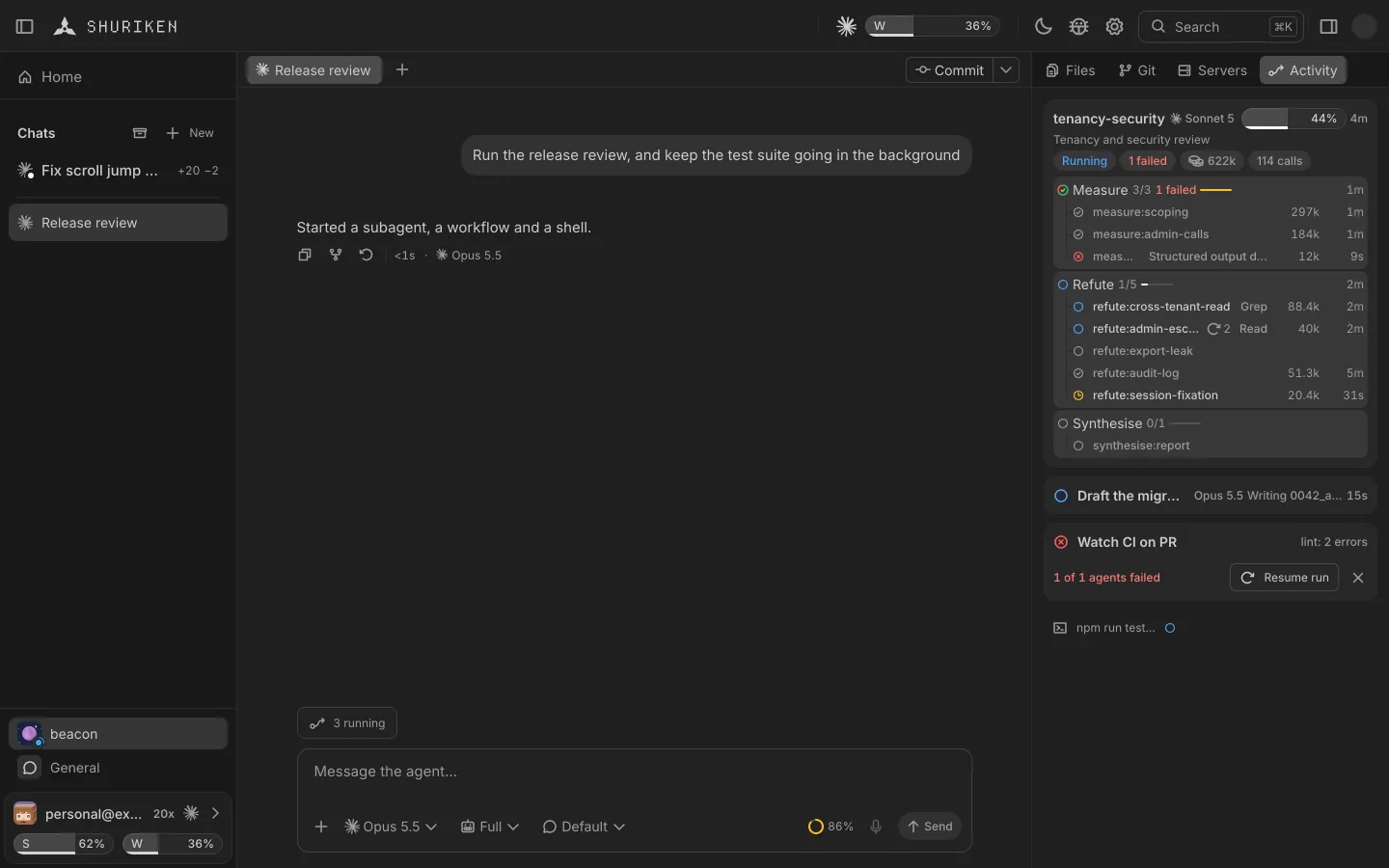
Finish rebases the branch and runs the commands listed in shuriken.json. A red one goes back to the agent of that chat, three tries at most, then the branch stays unmerged. A branch that adds what looks like a secret is refused (Finish, step by step).
Checks can't tell you whether a test would have failed without the fix. That part is still yours. If you want one diff per task, a second agent's comments on it and a merge that waits for your checks, try Shuriken.
Sources
- Security: related resources, /security-review (Claude Code docs) (accessed 22 October 2026)
Frequently asked questions
Do I have to read every line an AI agent writes?
No. We read four things closely: the tests, the minus lines, the file list from git diff --stat and anything near a secret. oxfmt, oxlint and tsc cover formatting and types in our repo, and then we click through the change once.
What do coding agents most often get wrong?
Three from our own history, September and October 2026: two install specs that passed because Claude Code was already installed, a createWorkspace helper deleted along with one unwanted test, and an expired install script that exited 0. No check went red for any of them.
Can an AI review AI-generated code?
Yes, as a second reader. Pick a different agent from the one that wrote the change and tell it not to edit files. Claude Code also has a /security-review command for the changes on your branch.
How do I see only what an agent deleted?
git diff --name-status main...HEAD lists deleted files with a D. For deleted lines inside files, read the minus lines of git diff main...HEAD, or filter them with grep '^-'.


