Delete your account, and everything we hold
Settings › Account › Delete, confirmed by email, erases everything Shuriken's cloud holds for you. Your code and chats stay on your own computers.

Contents
Here's a thing nobody asks for until the day they really need it: a way to leave.
We think leaving should be as easy as arriving. Before 5.1, the app had no button for it: you had to email us and ask. That's fine for a handful of early testers and wrong for a product people trust with their sign-ins. So in 5.1 it's a button.
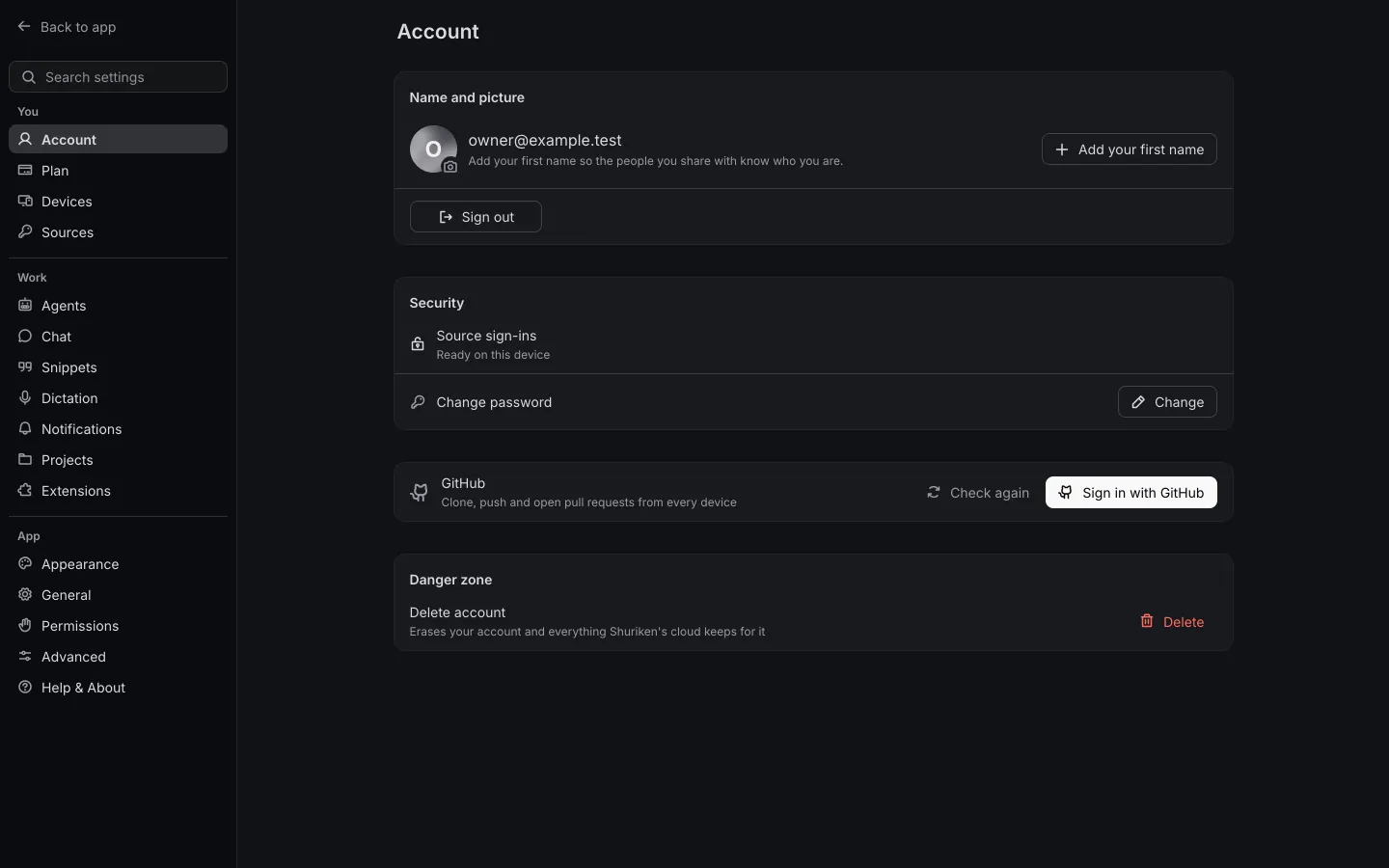
How to delete your account#
- Open Settings › Account.
- Scroll to the foot of the page and choose Delete.
- A sheet opens and lists, in plain words, what is erased and what stays. Read it. We wrote it to be read.
- Press Email me a confirmation link.
- Open the link we send you. It works for 30 minutes. Confirm, and you're done.
Why the email step? Because a delete button that works from any open laptop is a delete button anyone at your desk can press. The link proves it's you, at your inbox, on purpose. If you change your mind, ignore the email and nothing happens.
Take your data with you first#
The sheet has a second button, Export my data first. It saves everything our cloud holds for your account as a JSON file, so you can see exactly what we had before it goes. You don't have to use it. We'd still like you to know it's there.
What gets erased#
Everything our cloud keeps for you. The sheet lists it, and so will we:
- your account and its sign-ins on every device;
- your devices;
- your projects list and their pictures;
- your sources' sign-ins and keys, and your synced settings (the vault);
- bug reports and their screenshots;
- usage readings;
- notification subscriptions;
- preview links;
- your old waitlist entry, if you had one.
That includes the smaller stuff you'd never think of: GitHub and Linear connections, webhook secrets, two-factor recovery codes, password-reset links. Behind the scenes, every table that holds account data is on one list, and a test fails if someone adds a new kind of account data without wiring it into deletion. Boring, and exactly the kind of boring we want.
Shared projects (beta) are on that list too: the projects you share stop being shared, and you leave the ones you joined.
Backups age out within 30 days, as our security page says.
What stays, and why#
Two small, anonymous things stay behind:
- A monthly count of how many accounts were deleted. A number, with no names attached.
- Hashes of your devices' random tokens, for 90 days. That's so a laptop that wakes up next week hears "This account was deleted" instead of a confusing plain sign-out. After 90 days, those go too.
One less small thing: if you pay for Pro, the subscription ends with the account, without a refund for the time left. Within 14 days of ordering, withdraw from the contract first at shuriken.sh/withdraw. Orders and invoices are kept for 10 years because tax and consumer law require it, with the link to your account removed.
What was never ours#
This is the part we like most. Deleting your Shuriken account doesn't touch your work, because your work was never on our servers.
Shuriken runs your agents on your computers and servers. Your code, your chats, your files and your history live there. Our cloud signs you in, links your devices and relays messages it can't read. We wrote up exactly what it can and can't see in What our cloud can and can't see, and why we built it that way in Agents on your machines.
So after you delete your account:
- Chats and files on your computers stay there as your own files. Each computer is signed out, that's all.
- Your Claude, ChatGPT and other provider accounts are untouched. They're yours. If you want to cancel those, do it with the provider.
- Your git repositories are exactly where you left them. Branches, worktrees, commits: all on your disk.
Coming back#
A deleted account can't be restored. If you return one day, you sign up again with the same address, as a new account. Your repositories are still on your disk, so you can add a project again and pick up from there.
Questions#
If something in the sheet is unclear, or you'd rather a person handled it, write to office@shuriken.sh. The FAQ covers the rest of the account questions.
And if you're reading this before you've even tried Shuriken: it's nice to know where the exit is before you walk in. Try Shuriken when you're ready.
Frequently asked questions
How do I delete my Shuriken account?
Open Settings › Account, scroll to the foot of the page and choose Delete. Shuriken emails you a confirmation link that works for 30 minutes. Open it, confirm, and the account is gone.
Does deleting my account delete my code and chats?
No. Your code, chats and files live on your own computers and servers, and they stay there as your own files. Each computer is only signed out.
Does it cancel my Claude or ChatGPT subscription?
No. Shuriken erases the sign-ins it kept for your sources, but your accounts with Anthropic, OpenAI and the other providers are yours. Cancel those with the provider.
Can I get my data out first?
Yes. The delete sheet has an Export my data first button that saves what the cloud holds for you as a JSON file.
Can a deleted account be restored?
No. Deletion can't be undone. You can sign up again with the same email address later, as a new account.


