Your agents on your phone, from the browser
Open app.shuriken.sh in any phone browser and add it to your home screen: every chat, the queue, Changes and voice. Browsers never count as devices.

Contents
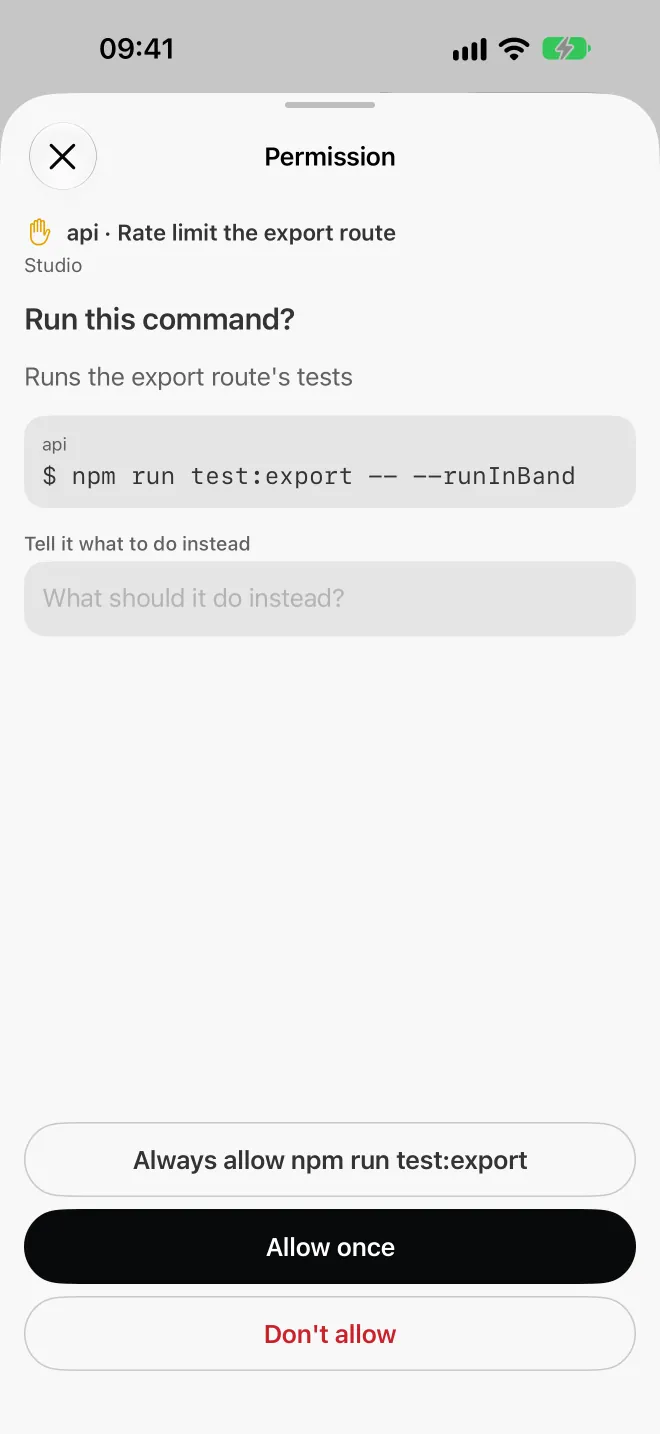
The moment we kept running into wasn't about switching accounts or worktrees. It was simpler: start a big refactor, go to lunch, and spend lunch wondering whether the agent was stuck on a question.
An agent that waits twenty minutes for a yes is twenty minutes wasted. So the phone got the same treatment as the desktop: the whole app, in your pocket, from the browser you already have.
Open it, then add it to your home screen#
Go to app.shuriken.sh on your phone and sign in. That's it. No store, no install file, no waiting for a review.
To make it feel like an app:
- iPhone: open it in Safari, tap Share, then Add to Home Screen.
- Android: open it in Chrome, open the ⋮ menu, then Add to Home screen (some versions say Install app).
From then on it opens full screen from its own icon, without the browser bars.
What you can do from it#
You see every chat, live, from all your projects on every computer and server you've added. A running chat shows it, and one that's waiting on you is easy to spot.
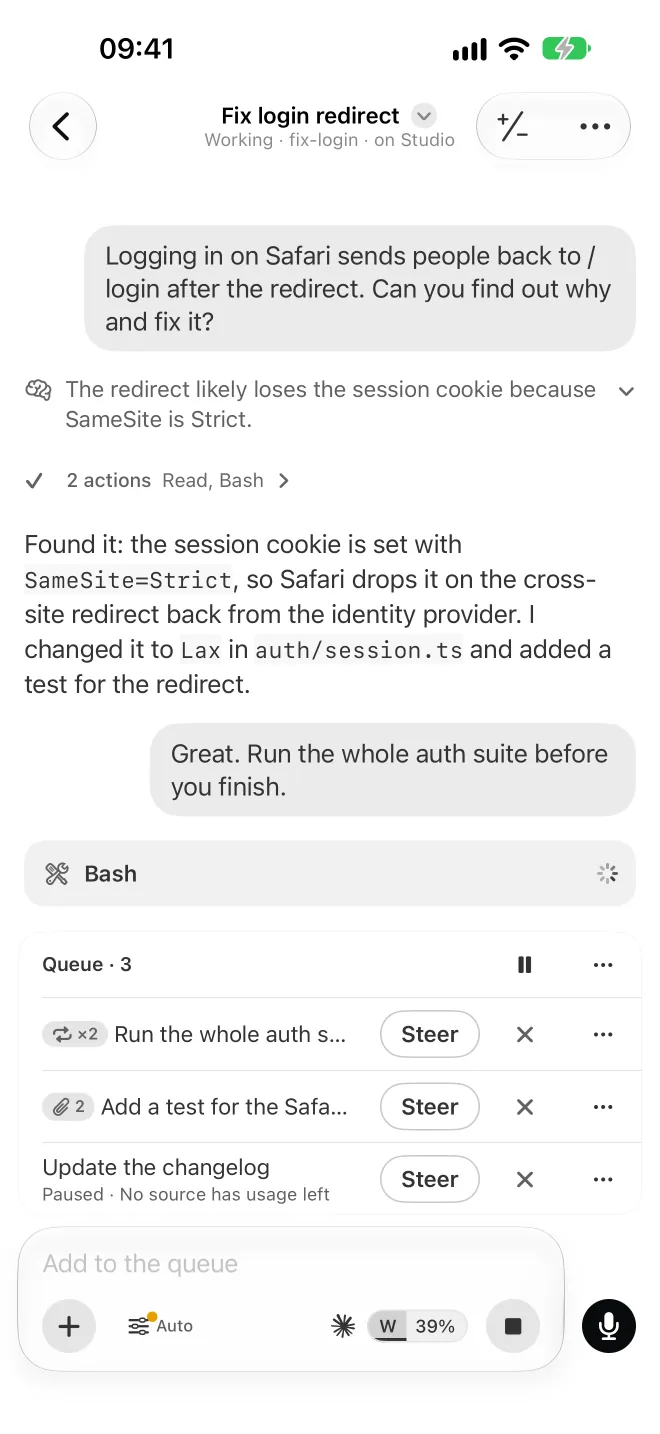
You can type the next message while the agent is still working. It goes into the queue and waits its turn, and you can edit, reorder or remove rows before they go. Changes shows what the agent changed in the chat's branch, so you can look before you tell it to carry on. And you can say the reply instead of thumbing it out: voice goes into the chat, or into the queue while the agent works.
What you won't find on the phone are the things that only make sense on the machine itself: the built-in browser with Design mode, and Open in (your editor or terminal), live in the desktop app.
Your phone follows, your computers work#
The phone runs nothing. Your agents run on your own computers and servers, where your code and chat history already live. The phone is a window onto them.
What travels between your devices is end-to-end encrypted: sealed on one device, opened on another. Our cloud relays it and can't read it. The security page lists exactly what our cloud can and can't see.
One honest note: the web app itself is served by our cloud. It runs under a strict content security policy. Its files are listed with fingerprints in a signed list, and the desktop app checks what the cloud serves against that list when it starts and every six hours, and shows a note if a file differs. That's detection, though, not a guarantee. For anything sensitive, the desktop app is the stronger choice, because it carries its own code and never loads any from us.
Browsers never count as devices#
The Free plan includes two linked devices: say, your laptop and a server. A browser is never one of them. Open the web app on your phone, your tablet and a borrowed laptop, and none of that touches your device count.
Faster since 2.1#
Release 2.1, on 9 October, was mostly about the phone. We went through it press by press and made each one fast. One example: a single piece of the phone bundle, the part that checks every message, shrank from 7.6 MB to 1.7 MB. A smaller bundle starts faster, and you notice it most on a train's patchy signal.
5.1 went back to it. Switching projects now redraws only what changed, Home builds a project's menu when you open it, and one part of the layout keeps every screen clear of the status bar, so nothing ends up under the clock. The computer side got faster too: a very long chat history loads in pieces, so the phone no longer waits on it (the "Connection lost" fix).
Native apps are next#
On 22 October 2026 we decided to build native iOS and Android apps from scratch, and they're planned for November 2026. You can read why in We're building native iOS and Android apps. Until they land, the web app is the way to use Shuriken on a phone, and everything above still applies.
How this compares with Claude Code's Remote Control#
Anthropic has its own answer to "my agent is on my laptop and I'm not". Remote Control connects claude.ai/code or the Claude app for iOS and Android to a Claude Code session running on your machine. Claude keeps running locally, your machine makes outbound HTTPS requests only, and traffic goes through the Anthropic API over TLS. It works on the Pro, Max, Team and Enterprise plans, and not with API keys (Anthropic's docs, read 22 October 2026).
If you use Claude Code on one Claude account, that's built in and it's good. Use it.
Shuriken's web app is for a different day: you run Claude Code next to Codex or Gemini CLI, on a laptop and a server, across a couple of accounts that take over from each other when one runs out. The web app shows all of that in one list, and the switching keeps happening on your machines whether you're looking or not. For a side-by-side of phone options, see our Remote Control and Happy Coder comparison, and the phone feature page for the short version.
Try it#
The phone follows a computer, so it needs one running Shuriken first. If you don't have that yet, try Shuriken on the computer that does the work; our guide on running Claude Code from your phone goes through it from zero. Then sign in at app.shuriken.sh on the phone.
Sources
- Claude Code docs: Continue local sessions from any device with Remote Control (accessed 22 October 2026)
Frequently asked questions
How do I put Shuriken on my iPhone's home screen?
Open app.shuriken.sh in Safari, sign in, then tap Share › Add to Home Screen. It opens full screen from its own icon, like an app.
Does the web app count as one of my linked devices?
No. Browsers never count as linked devices, on any plan. Free includes two linked devices, and you can open the web app on as many phones and browsers as you like on top of that.
Do my agents run on my phone?
No. Your agents run on your own computers and servers. The phone shows their chats live and lets you reply, queue the next message and look at the changes.
Is there a native iPhone or Android app?
Native iOS and Android apps are planned for November 2026. Until then, the web app is how you use Shuriken on a phone.
How is this different from Claude Code's Remote Control?
Remote Control connects claude.ai/code or the Claude app to Claude Code sessions on your machine, on a Claude subscription. Shuriken's web app follows every chat on all your computers and servers, for Claude Code, Codex, Gemini CLI and the other agents you run.


