Shuriken on Linux: AppImage, .deb, x64 and Arm
A desktop app for Claude Code, Codex and 65 more agents on Linux: AppImage or .deb, x64 or Arm, ChromeOS too, plus a headless server mode.

Contents
A lot of tools for coding agents start on the Mac and get to Linux "later". We kept hearing from people whose real work happens on a Linux workstation, a ThinkPad, or a box under the desk, and who were tired of being later.
So Linux has been in Shuriken's release pipeline since the very first prerelease on 29 September. Every release builds it, alongside macOS and Windows.
What you can download#
Shuriken for Linux comes as an AppImage and a .deb, each for x64 and Arm. Both run on any 64-bit distribution, and in ChromeOS's Linux environment too.
There's no .rpm yet. If you're on Fedora, openSUSE or another rpm-based distribution, the AppImage is the way in for now.
Once installed, Shuriken updates itself, and each update is checked against our signature before it installs.
The first run#
A downloaded AppImage isn't executable yet. Make it so, then start it:
chmod +x Shuriken-linux-*.AppImage
./Shuriken-linux-x86_64.AppImage
If it stops with a message about FUSE, your distribution left out libfuse2 (on Ubuntu 24.04 it's called libfuse2t64). Install it, or take the .deb, which doesn't need it:
sudo apt install ./Shuriken-*-linux-amd64.deb
The same app as on a Mac#
The Linux app is the same app. It has:
- 67 coding agents: Claude Code, Codex, Gemini CLI, OpenCode, Aider and the rest, each using the sign-ins you already have.
- Automatic source switching. When one of your accounts reaches its switch point, your chats move to another of yours and keep going.
- 5-hour clocks, so an idle Claude account's 5-hour window starts with one tiny background request.
- Global MCPs. You sign in to an MCP server once and use it in every project.
- Parallel agents, each chat in the project folder or, if you pick it, on its own branch in its own git worktree.
- The built-in browser with Design mode. You point at an element on your running app and say what to change.
- Open in, for the editors and terminals you actually have installed: VS Code, Zed, the JetBrains IDEs, Neovim, Emacs, GNOME Terminal, Konsole, Files and more.
And the background service: your agents keep running with the window closed.
No screen? Run it as a server#
Plenty of Linux machines don't have a desktop at all. For those, there's the headless server: Shuriken without a window, on Linux x64 or Arm (glibc distributions and Alpine).
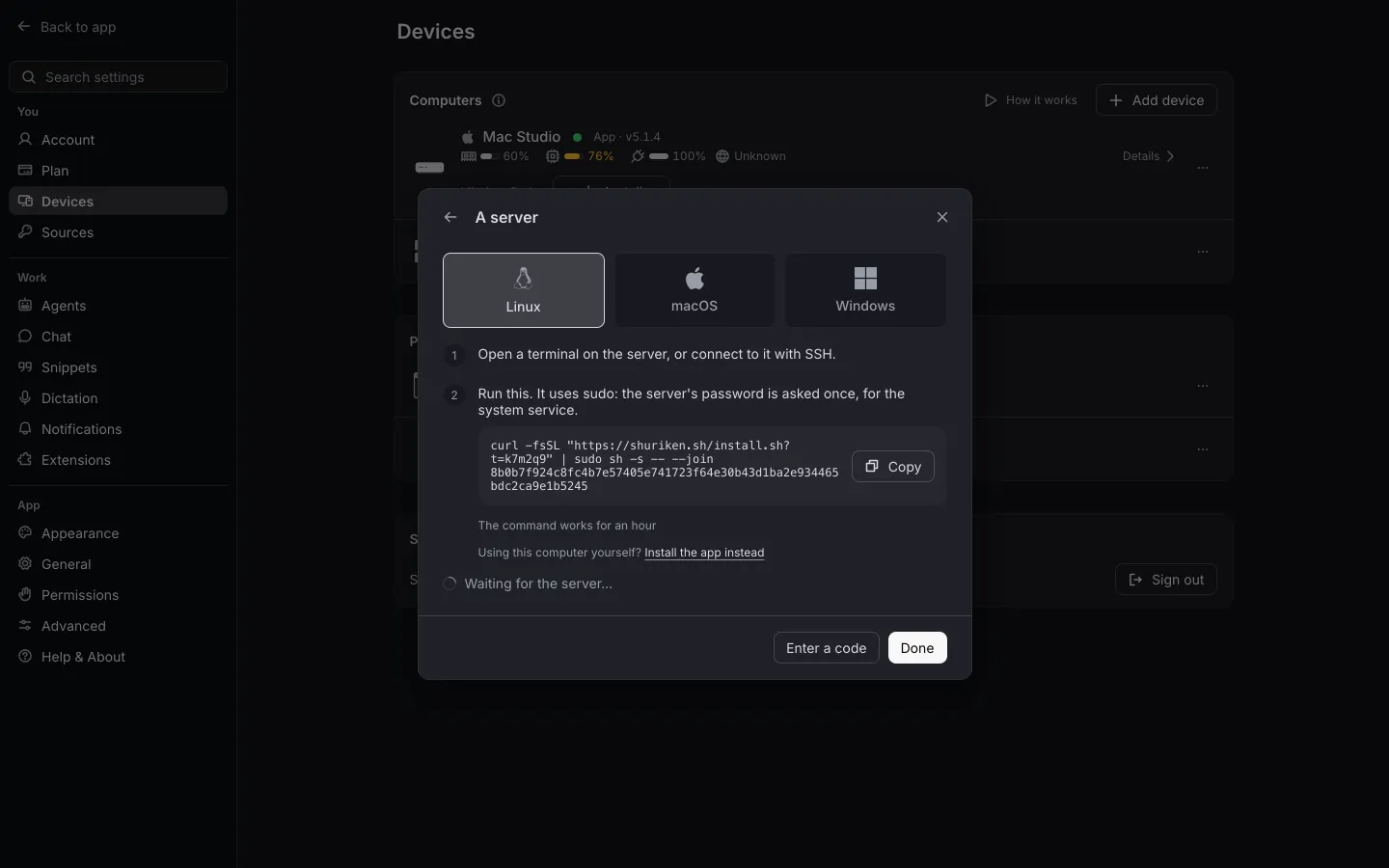
You add one from the app: Settings › Devices › Add device › A server. The app gives you install steps made for your account, valid for an hour. The installer also sets up the agent CLIs and your GitHub sign-in, and tells you which step it's on.
Once it's in, the server runs as a service and restarts on its own. It updates itself only to releases our key signed, and it waits until no agent is mid-turn before it does. You follow its chats from your laptop, your phone or any browser. The server page has the details.
Keep awake on Linux#
Yes, Cocaine mode made it to Linux. (We kept the name. We're not sorry.) Pick which of your computers stay awake, and they keep working while you're away from them.
On Linux this needs systemd-logind. Laptops differ, so the device picker tells you what each machine can do before you rely on it:
- "Keeps running with the lid closed"
- "Stays awake with the lid open; with the lid closed it needs a one-time permission"
- "Stays awake. No lid setting found"
The Cocaine mode page has the whole story, Mac and Windows included.
Compared with Mac-only tools#
If you've been looking at desktop apps for coding agents, you'll have noticed some only talk about the Mac. Conductor's documentation, for example, starts with "Get Conductor running on your Mac" (Conductor docs, read 22 October 2026). We compare the two fairly in Shuriken vs Conductor.
If your agents should run on the Linux machine you already have, try Shuriken: it comes as an AppImage or a .deb. The Linux page has the short version.
Sources
- Conductor docs (accessed 22 October 2026)
Frequently asked questions
Is there an .rpm package for Fedora or openSUSE?
Not yet. The AppImage runs on most 64-bit distributions, including Fedora and openSUSE, so use that for now.
Does Shuriken run on ChromeOS?
Yes, in ChromeOS's Linux environment. Install the .deb or the AppImage there like on any other Linux machine.
Can I run Shuriken on a Linux server with no screen?
Yes. Add it from the app under Settings › Devices › Add device › A server. It runs as a service, restarts on its own and updates itself only to signed releases.
Does keep awake work with the lid closed on a Linux laptop?
It depends on the laptop. Keep awake on Linux needs systemd-logind, and the device picker tells you what each machine can do before you turn it on.
Why won't the AppImage start?
Usually one of two things. It isn't executable yet, so run chmod +x on it first. Or it needs FUSE: install libfuse2 (libfuse2t64 on Ubuntu 24.04), or use the .deb instead.


